
Configure BGP to Communicate between two ASes
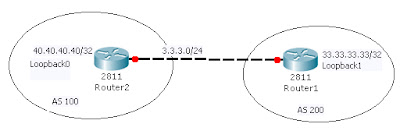
Router 1 Config:
!
interface FastEthernet0/0
ip address 172.16.19.19 255.255.0.0
duplex auto
speed auto
!
!
interface Loopback1
ip address 33.33.33.33 255.255.255.255
!
R1(config)#router bgp 200
R1(config-router)#neighbor 3.3.3.1 remote-as 100
R1(config-router)#neighbor 3.3.3.1 ebgp-multihop 2
R1(config-router)#neighbor 3.3.3.1 update-source loopback 1
R1(config)#ip route 0.0.0.0 0.0.0.0 3.3.3.1
Router 2 Configuration:
!
interface Loopback0
ip address 40.40.40.40 255.255.255.255
!
!
interface FastEthernet0/0
ip address 3.3.3.1 255.255.255.0
duplex auto
speed auto
!
R2(config)#router bgp 100
R2(config-router)#neighbor 3.3.3.2 remote-as 200
R2(config-router)#neighbor 3.3.3.2 ebgp-multihop 2
R2(config-router)#neighbor 3.3.3.2 update-source loopback 0
R2(config)#ip route 0.0.0.0 0.0.0.0 3.3.3.2
R2#sh ip bgp neighbors
BGP neighbor is 3.3.3.2, remote AS 200, external link
BGP version 4, remote router ID 36.36.36.36
BGP state = Established, up for 00:34:04
<output truncated>
R2#sh ip bgp summary
BGP router identifier 3.3.3.1, local AS number 100
BGP table version is 1, main routing table version 1
Neighbor V AS MsgRcvd MsgSent TblVer InQ OutQ Up/Down State/PfxRcd
3.3.3.2 4 200 38 38 1 0 0 00:34:28 0
R2#ping 33.33.33.33
Type escape sequence to abort.
Sending 5, 100-byte ICMP Echos to 33.33.33.33, timeout is 2 seconds:
!!!!!
Success rate is 100 percent (5/5), round-trip min/avg/max = 1/2/4 ms
R1#sh ip bgp neighbors
BGP neighbor is 3.3.3.1, remote AS 100, external link
BGP version 4, remote router ID 3.3.3.1
BGP state = Established, up for 00:38:08
<output truncated>
R1#sh ip bgp summary
BGP router identifier 36.36.36.36, local AS number 200
BGP table version is 1, main routing table version 1
Neighbor V AS MsgRcvd MsgSent TblVer InQ OutQ Up/Down State/PfxRcd
3.3.3.1 4 100 42 42 1 0 0 00:38:49 0
R1#ping 40.40.40.40
Type escape sequence to abort.
Sending 5, 100-byte ICMP Echos to 40.40.40.40, timeout is 2 seconds:
!!!!!
Success rate is 100 percent (5/5), round-trip min/avg/max = 1/1/4 ms

Router 1 Config:
!
interface FastEthernet0/0
ip address 172.16.19.19 255.255.0.0
duplex auto
speed auto
!
!
interface Loopback1
ip address 33.33.33.33 255.255.255.255
!
R1(config)#router bgp 200
R1(config-router)#neighbor 3.3.3.1 remote-as 100
R1(config-router)#neighbor 3.3.3.1 ebgp-multihop 2
R1(config-router)#neighbor 3.3.3.1 update-source loopback 1
R1(config)#ip route 0.0.0.0 0.0.0.0 3.3.3.1
Router 2 Configuration:
!
interface Loopback0
ip address 40.40.40.40 255.255.255.255
!
!
interface FastEthernet0/0
ip address 3.3.3.1 255.255.255.0
duplex auto
speed auto
!
R2(config)#router bgp 100
R2(config-router)#neighbor 3.3.3.2 remote-as 200
R2(config-router)#neighbor 3.3.3.2 ebgp-multihop 2
R2(config-router)#neighbor 3.3.3.2 update-source loopback 0
R2(config)#ip route 0.0.0.0 0.0.0.0 3.3.3.2
R2#sh ip bgp neighbors
BGP neighbor is 3.3.3.2, remote AS 200, external link
BGP version 4, remote router ID 36.36.36.36
BGP state = Established, up for 00:34:04
<output truncated>
R2#sh ip bgp summary
BGP router identifier 3.3.3.1, local AS number 100
BGP table version is 1, main routing table version 1
Neighbor V AS MsgRcvd MsgSent TblVer InQ OutQ Up/Down State/PfxRcd
3.3.3.2 4 200 38 38 1 0 0 00:34:28 0
R2#ping 33.33.33.33
Type escape sequence to abort.
Sending 5, 100-byte ICMP Echos to 33.33.33.33, timeout is 2 seconds:
!!!!!
Success rate is 100 percent (5/5), round-trip min/avg/max = 1/2/4 ms
R1#sh ip bgp neighbors
BGP neighbor is 3.3.3.1, remote AS 100, external link
BGP version 4, remote router ID 3.3.3.1
BGP state = Established, up for 00:38:08
<output truncated>
R1#sh ip bgp summary
BGP router identifier 36.36.36.36, local AS number 200
BGP table version is 1, main routing table version 1
Neighbor V AS MsgRcvd MsgSent TblVer InQ OutQ Up/Down State/PfxRcd
3.3.3.1 4 100 42 42 1 0 0 00:38:49 0
R1#ping 40.40.40.40
Type escape sequence to abort.
Sending 5, 100-byte ICMP Echos to 40.40.40.40, timeout is 2 seconds:
!!!!!
Success rate is 100 percent (5/5), round-trip min/avg/max = 1/1/4 ms


